3DGS のファイルを、ブラウザでさっと確認して整える
Check and tidy 3DGS files, right in your browser
Splat Quick Viewer は、3D Gaussian Splatting のファイル(PLY・SPZ・SOG・.splat)を開いて中身を確かめ、不要なスプラットの選択と削除、トリミング、向きの修正、別形式への書き出しまでを 1 ページで行えるツールです。インストールは不要で、ファイルが外部に送られることもありません。
Splat Quick Viewer opens a 3D Gaussian Splatting file (PLY, SPZ, SOG or .splat) so you can inspect it, select and delete unwanted splats, trim it, fix its orientation and export it in any of those formats, all on one page. Nothing to install, and your file never leaves your device.
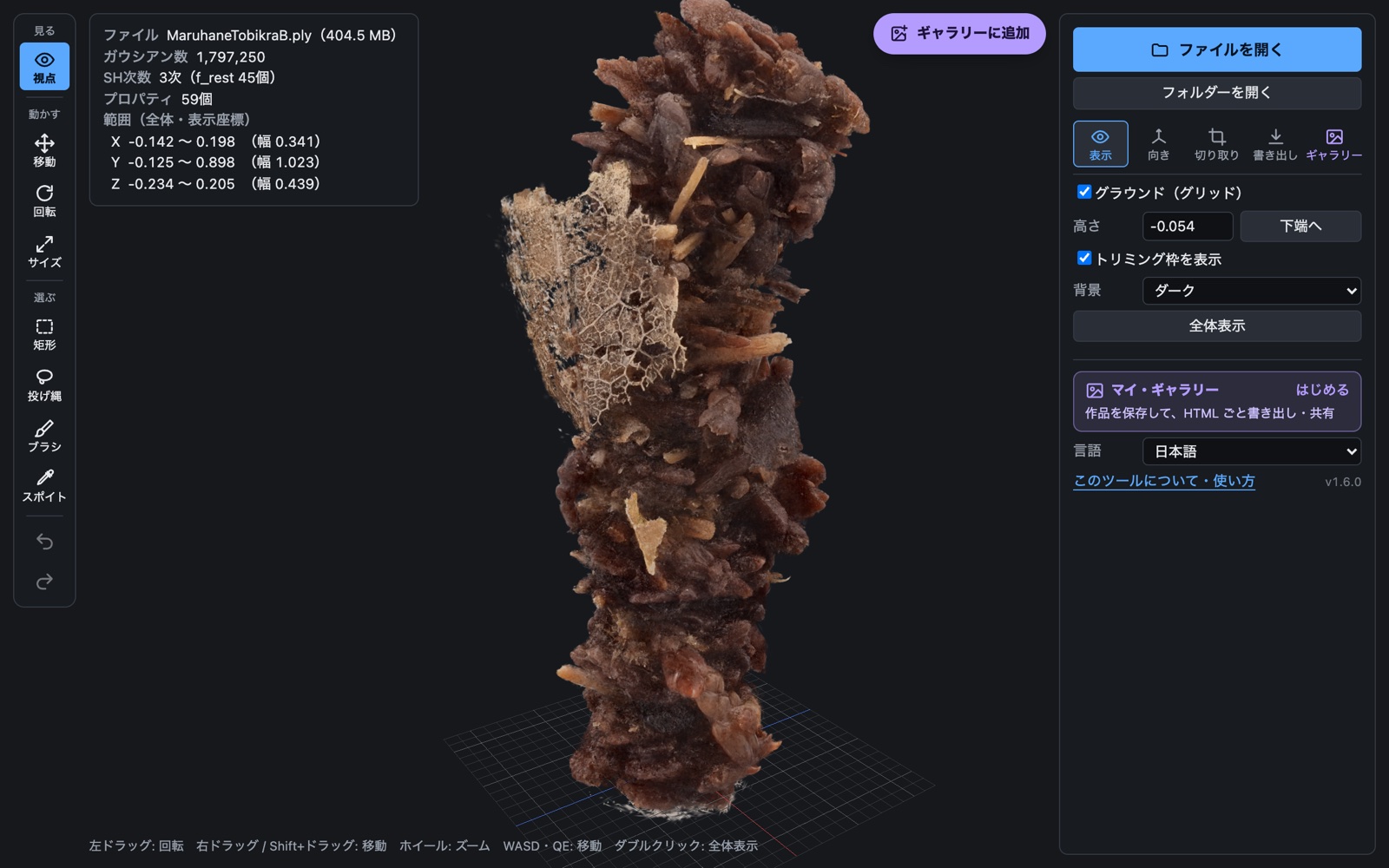
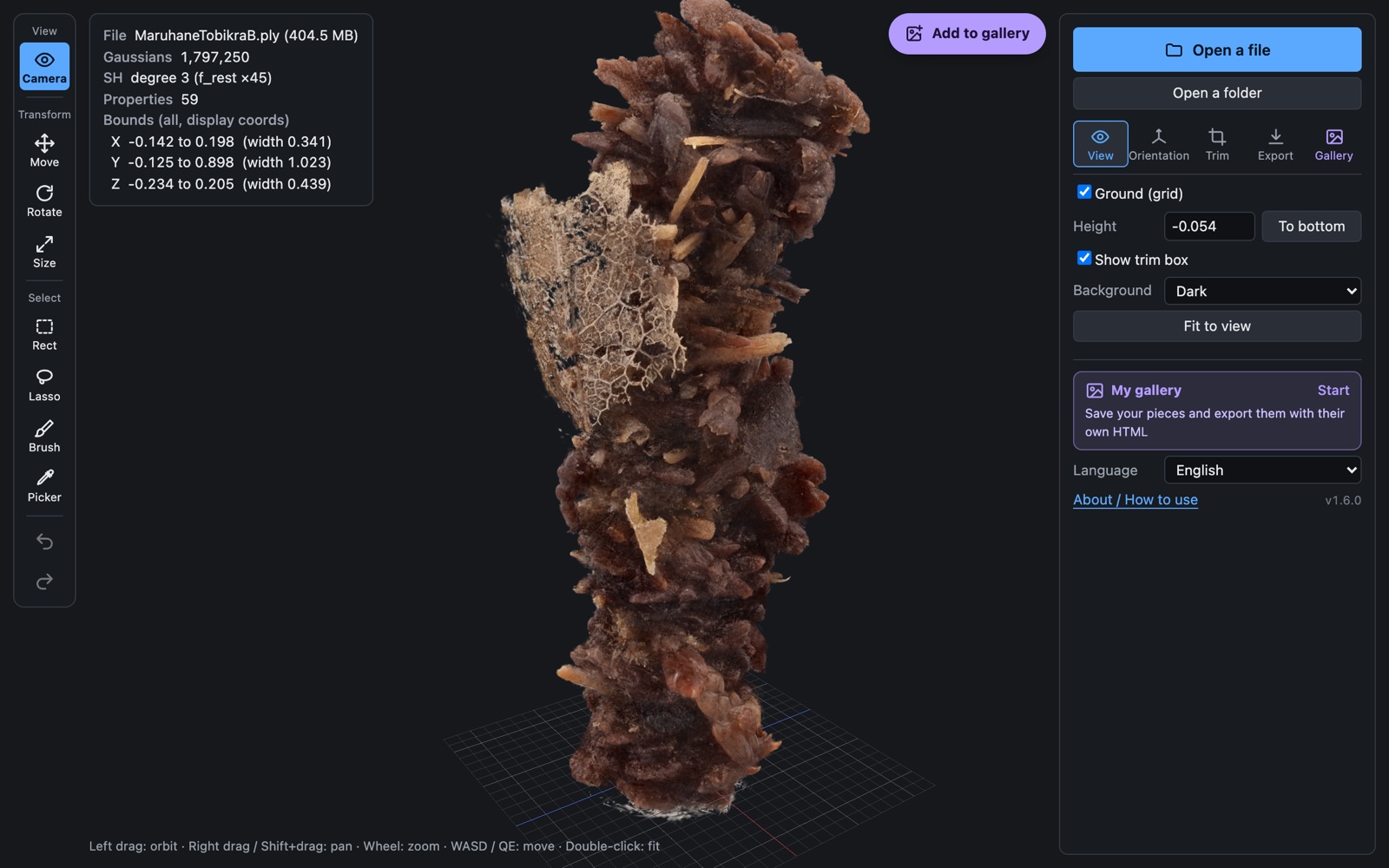
実際の画面。左にツール、右に設定のタブ、紫のボタンでギャラリーに保存します。
The real screen. Tools on the left, tabbed controls on the right, and the purple button saves to your gallery.
なぜ作ったか
Why it exists
3DGS の PLY は数十〜数百 MB になることが多く、「ちゃんと出来ているか」を確かめるだけでも専用のアプリを立ち上げる必要があります。作ったばかりのファイルや受け取ったファイルについて、まず知りたいのは次のようなことです。
- 壊れていないか、何個のガウシアンがあるか、SH は何次か
- どのくらいの広さで、どちらが上を向いているか
- 背景や浮遊物など、不要な部分がどれくらい混ざっているか
これをブラウザでファイルを落とすだけで確かめられるようにしたのが Splat Quick Viewer です。確かめたついでに、浮遊物などの不要なスプラットを選んで消し、範囲を切り落とし、向きを直し、軽い形式で保存するところまでをその場で済ませられます。
3DGS PLY files often run from tens to hundreds of megabytes, and just checking whether one came out right usually means launching a dedicated app. For a file you have just made or received, the first questions are simple:
- Is it intact, how many Gaussians does it hold, and what SH degree?
- How large is the scene, and which way is up?
- How much background or floating debris is mixed in?
Splat Quick Viewer answers these by dropping the file into a browser. While you are there, you can select and delete floaters and other unwanted splats, cut the scene down to a range, fix the orientation and save in a lighter format.
できること
What it does
使い方
How to use it
-
ファイルを開く
Open a file
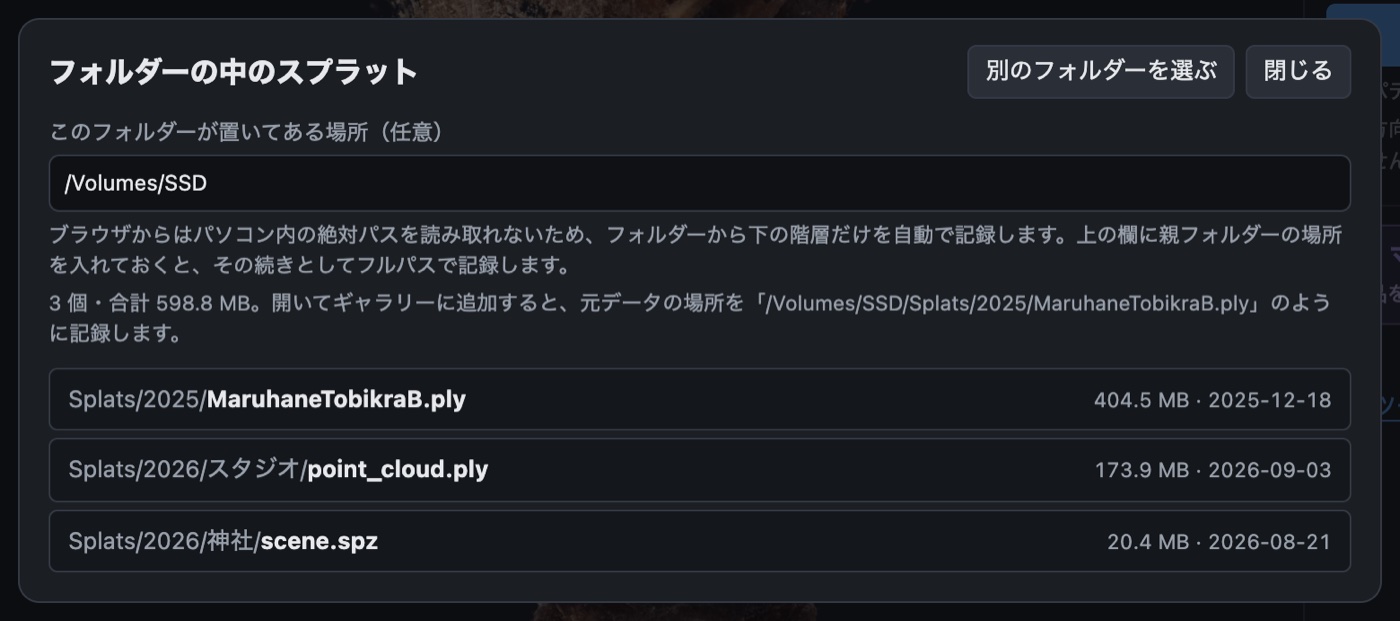
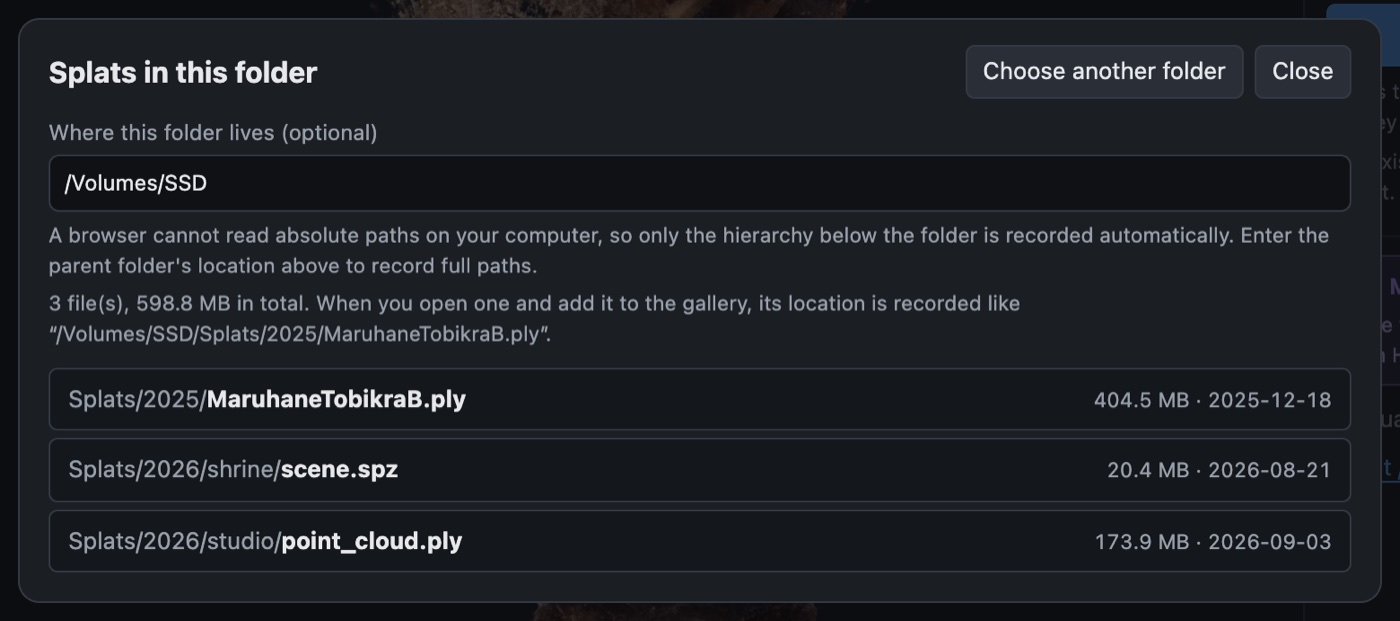
ビューアにファイルをドロップするか、ファイルを開く で選びます。フォルダーを選ぶと、中のスプラットが一覧になります。
Drop a file on the viewer or use Open a file. Pick a folder to list every splat inside it.
-
見て回る
Look around
操作 マウス タッチ 回転 左ドラッグ 1 本指 移動 右ドラッグ/Shift + ドラッグ 2 本指 ズーム ホイール ピンチ 歩き回る W A S D・Q E(Shift で速く) — 全体表示 ダブルクリック/F 全体表示 Action Mouse Touch Orbit Left drag One finger Pan Right drag / Shift + drag Two fingers Zoom Wheel Pinch Fly W A S D, Q E (Shift: faster) — Fit to view Double-click / F Fit to view -
向き・位置・サイズを直す
Fix orientation, position and size
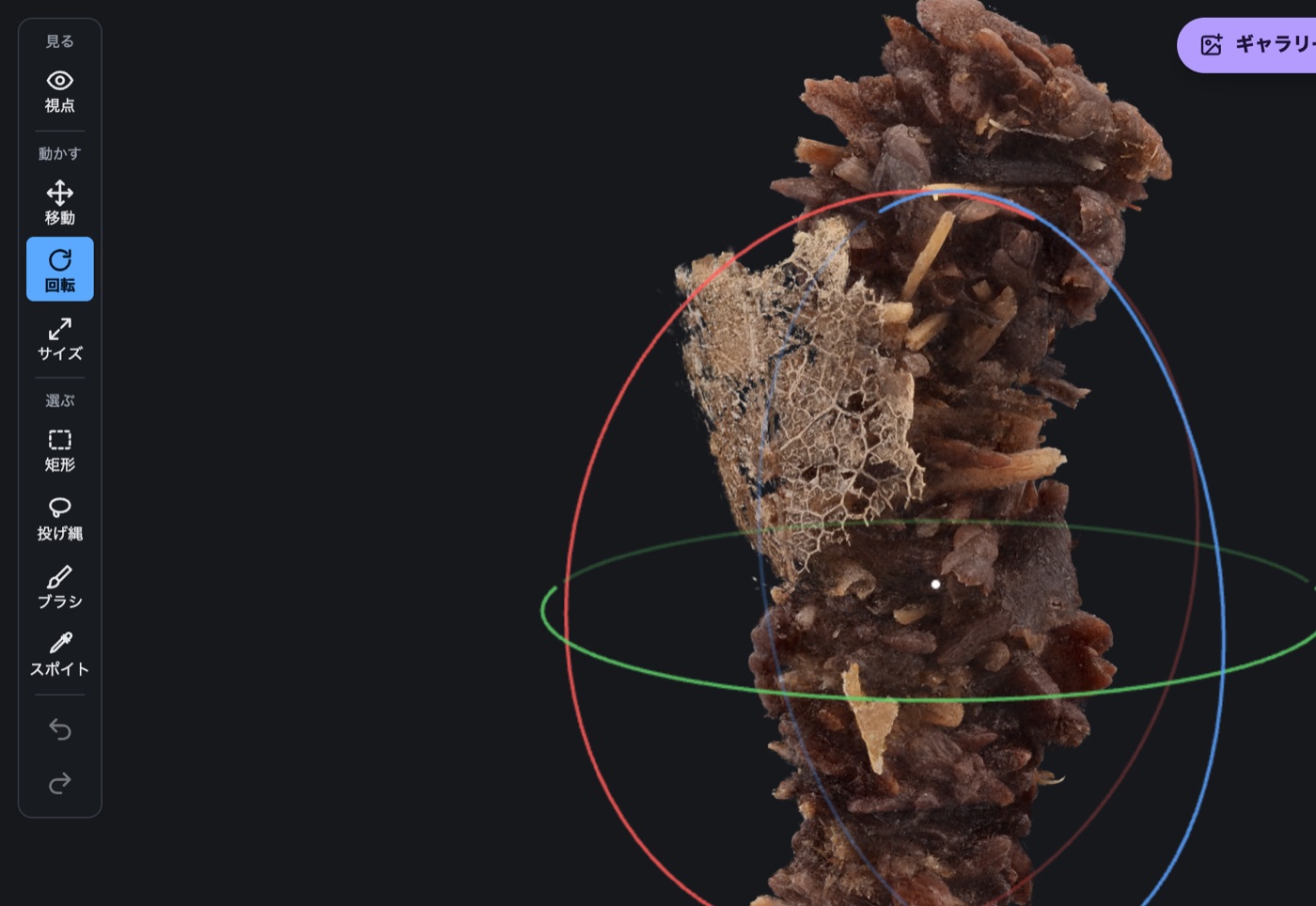
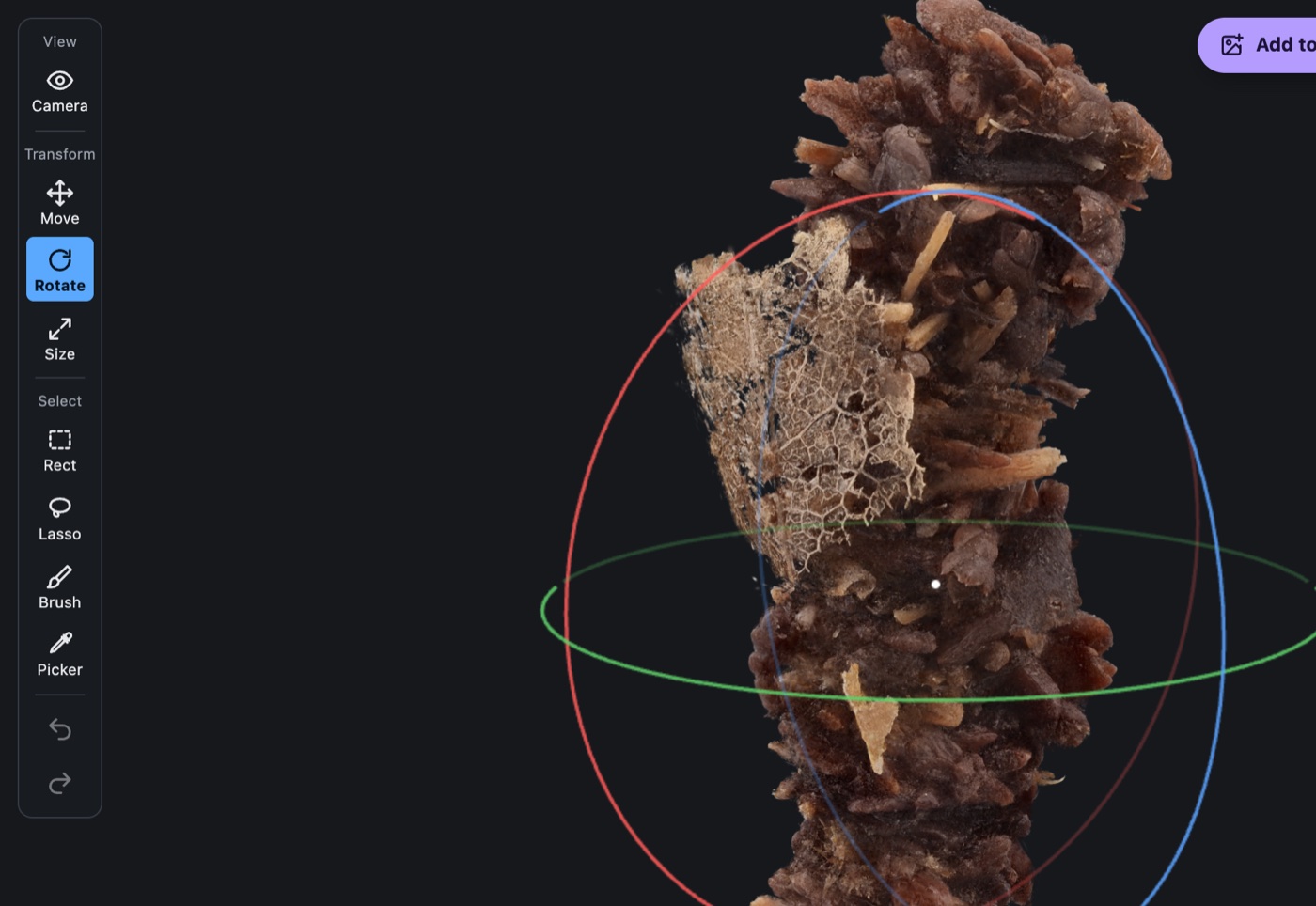
左の 回転(T)は色の輪、移動(G)は矢印、サイズ(K)は白い円をドラッグ。⌘/Ctrl で刻みごとに止まります。
Drag a coloured ring with Rotate (T), an arrow with Move (G), or the white circle with Size (K). Hold ⌘/Ctrl to snap in steps.
-
いらない部分を選んで消す
Select and delete what you don't want
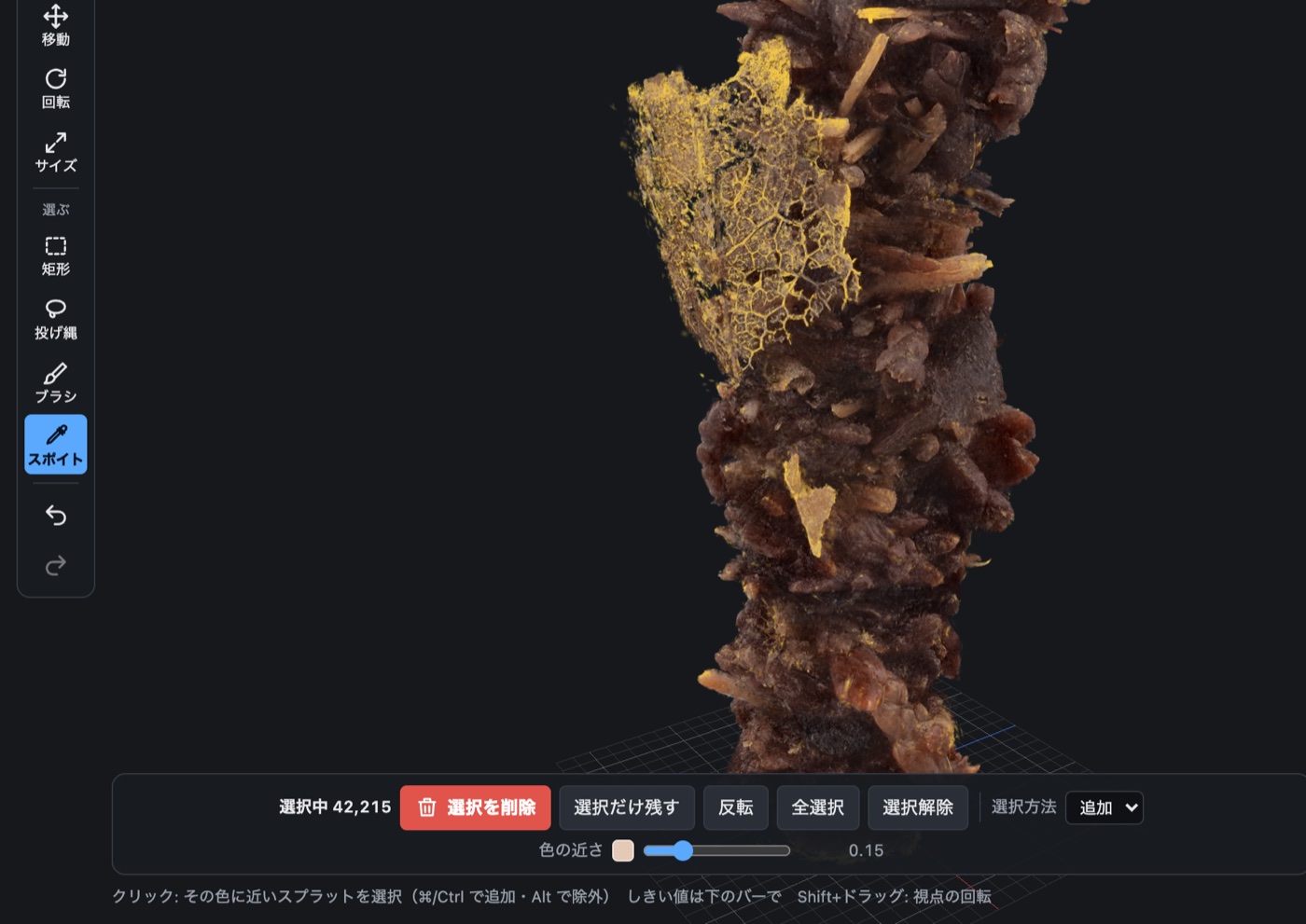
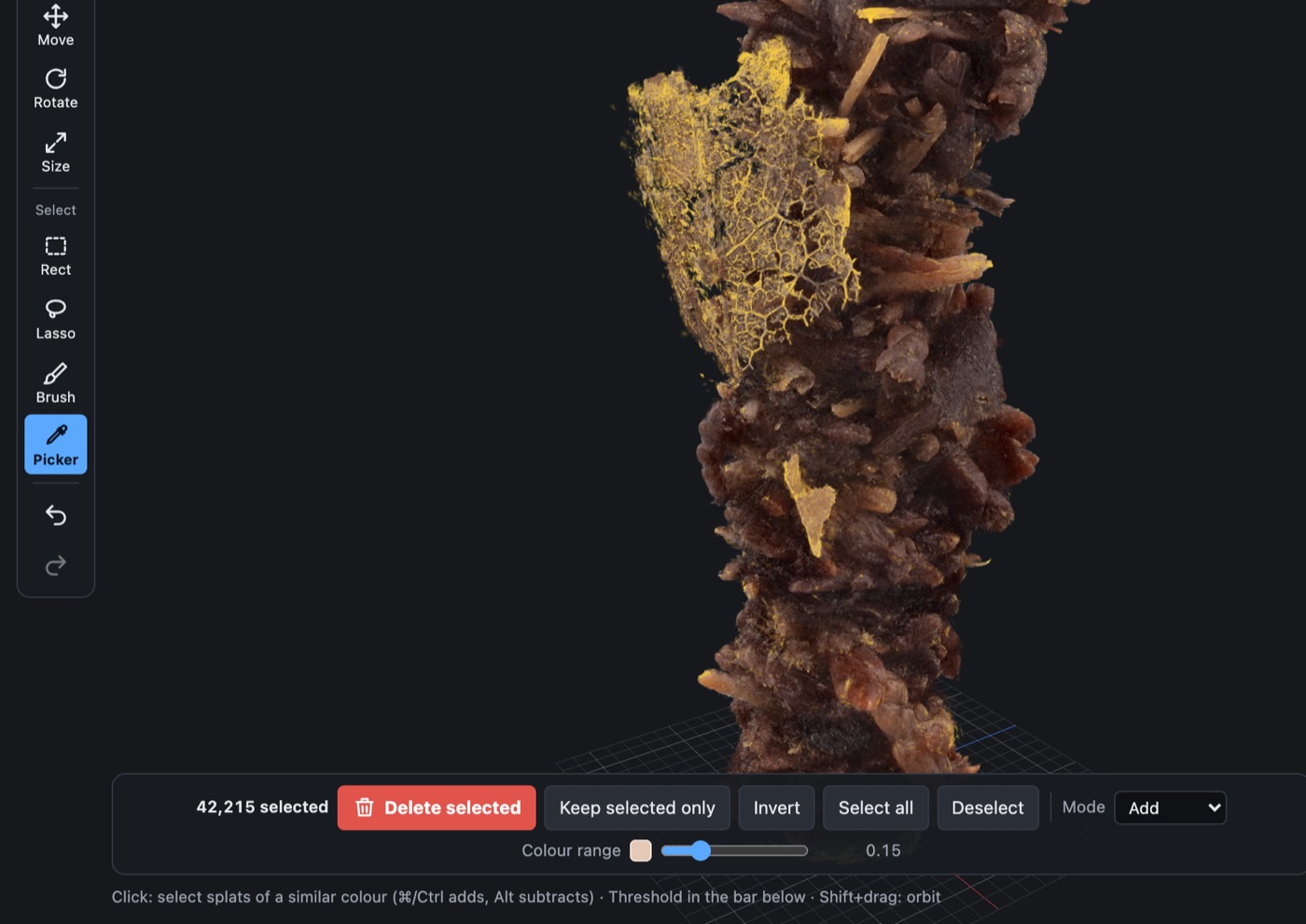
矩形・投げ縄・ブラシ でなぞるか、スポイト(I)で色をクリックすると黄色に。下の赤い 選択を削除 で消えます。スポイトは 色の近さ で選ぶ幅を調整できます。
Trace with Rect, Lasso or Brush, or click a colour with the Picker (I), and the splats turn yellow. The red Delete selected removes them. Colour range widens or narrows what the picker takes.
-
切り取って書き出す
Trim and export
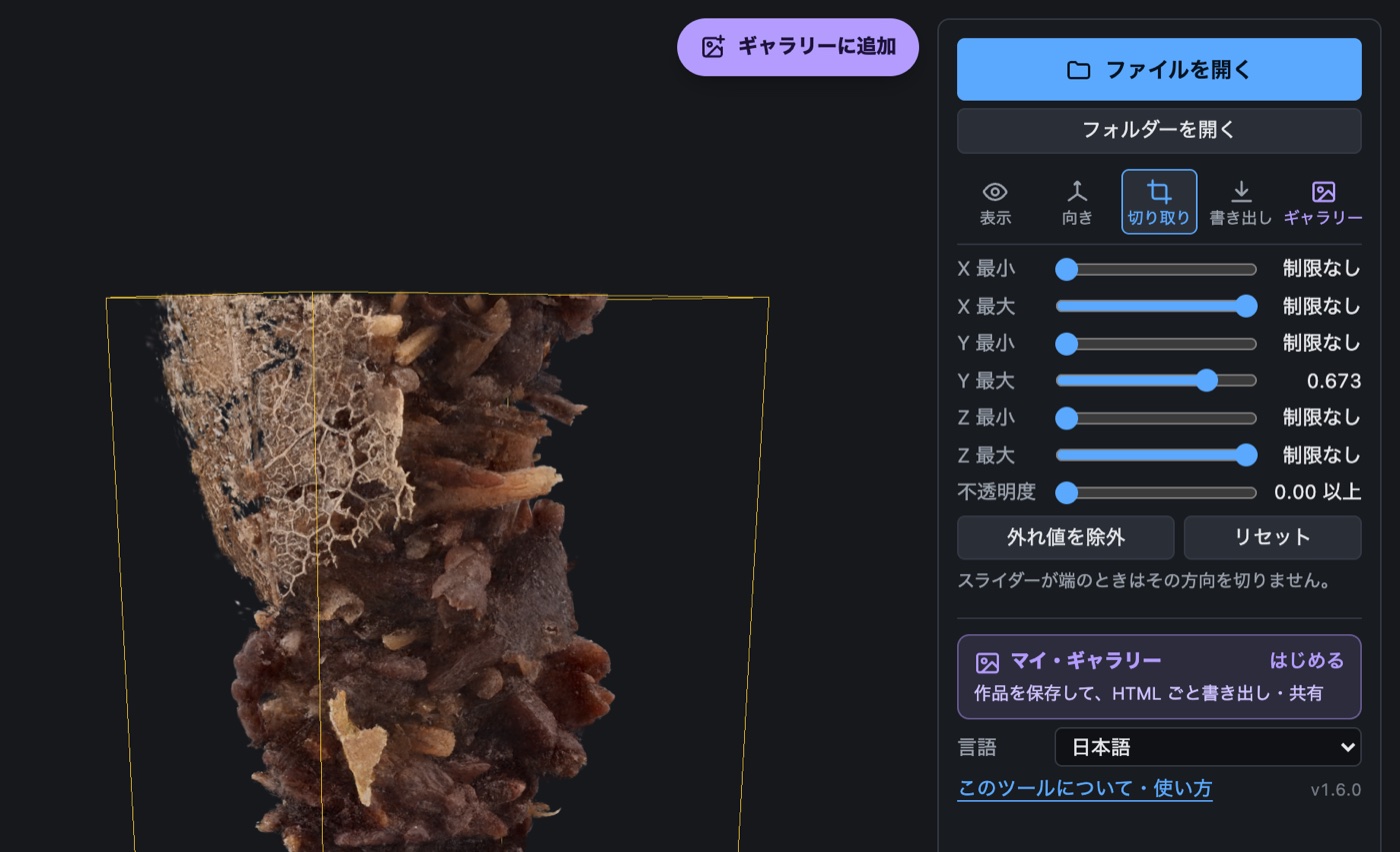
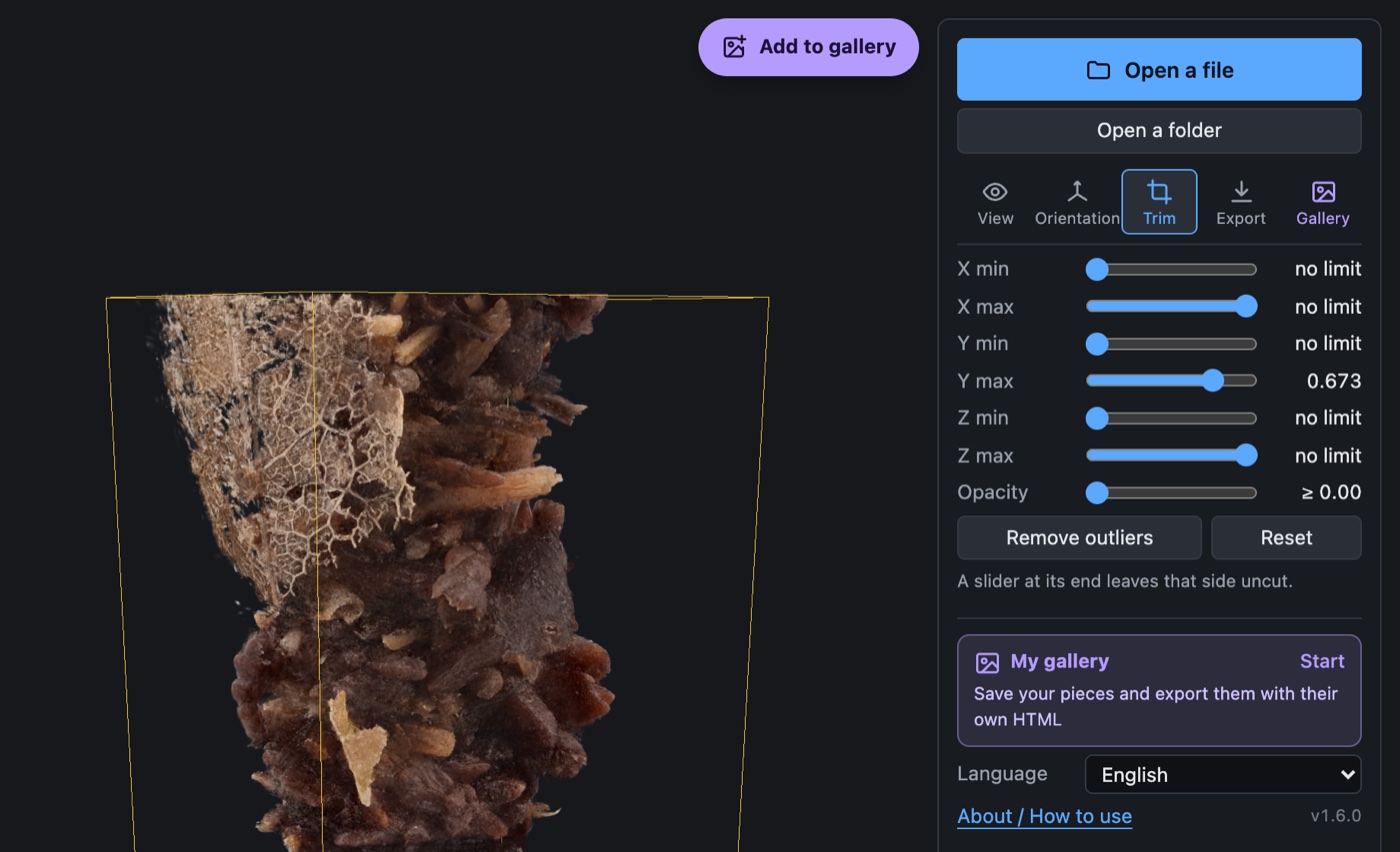
切り取り タブのスライダーで残す範囲(黄色の枠)を決め、書き出し タブで形式を選んで保存します。
Set the range to keep (the yellow box) on the Trim tab, then pick a format and save on the Export tab.
ギャラリーで整理・共有する
Organise and share with the gallery
-
ギャラリーに追加
Add to the gallery
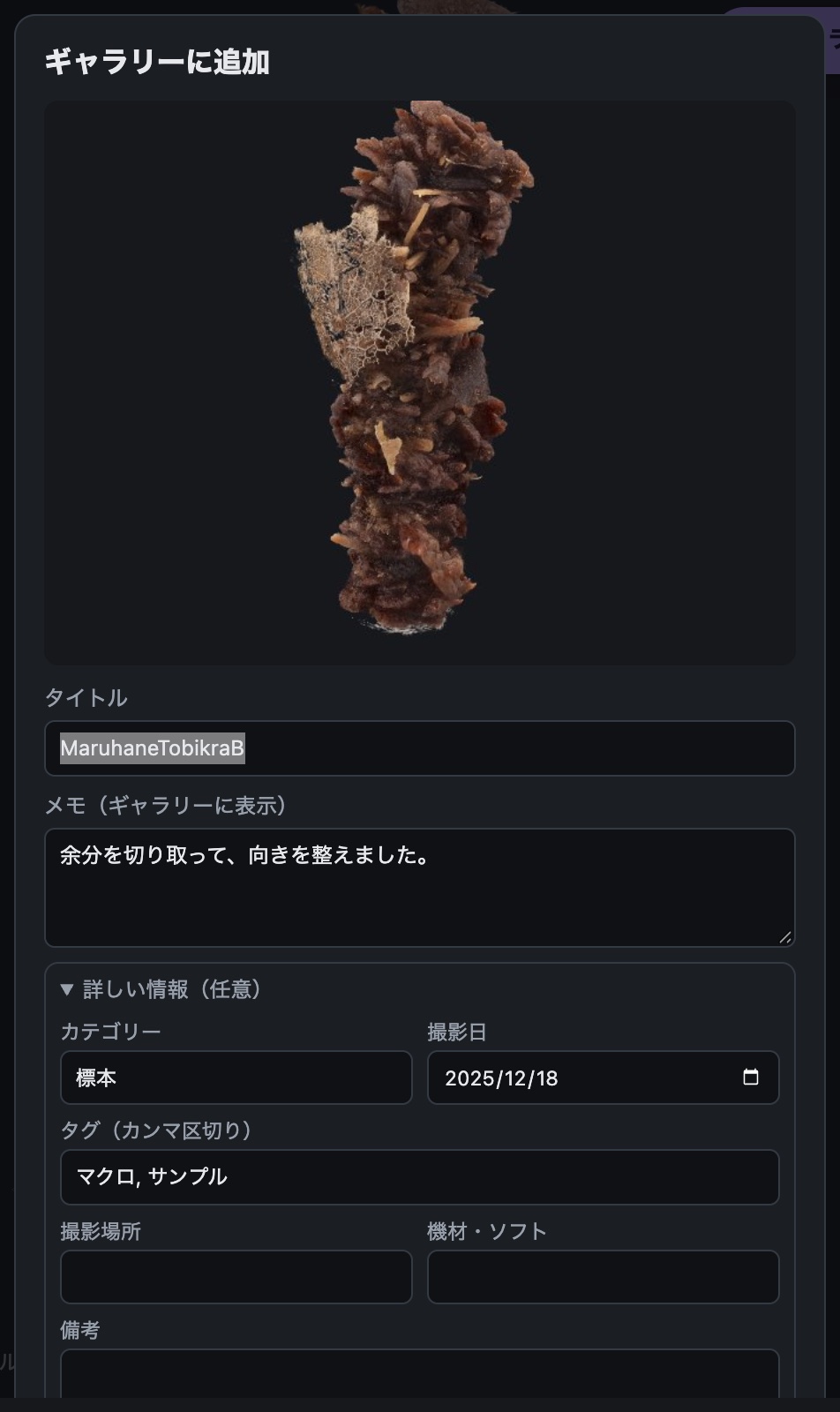
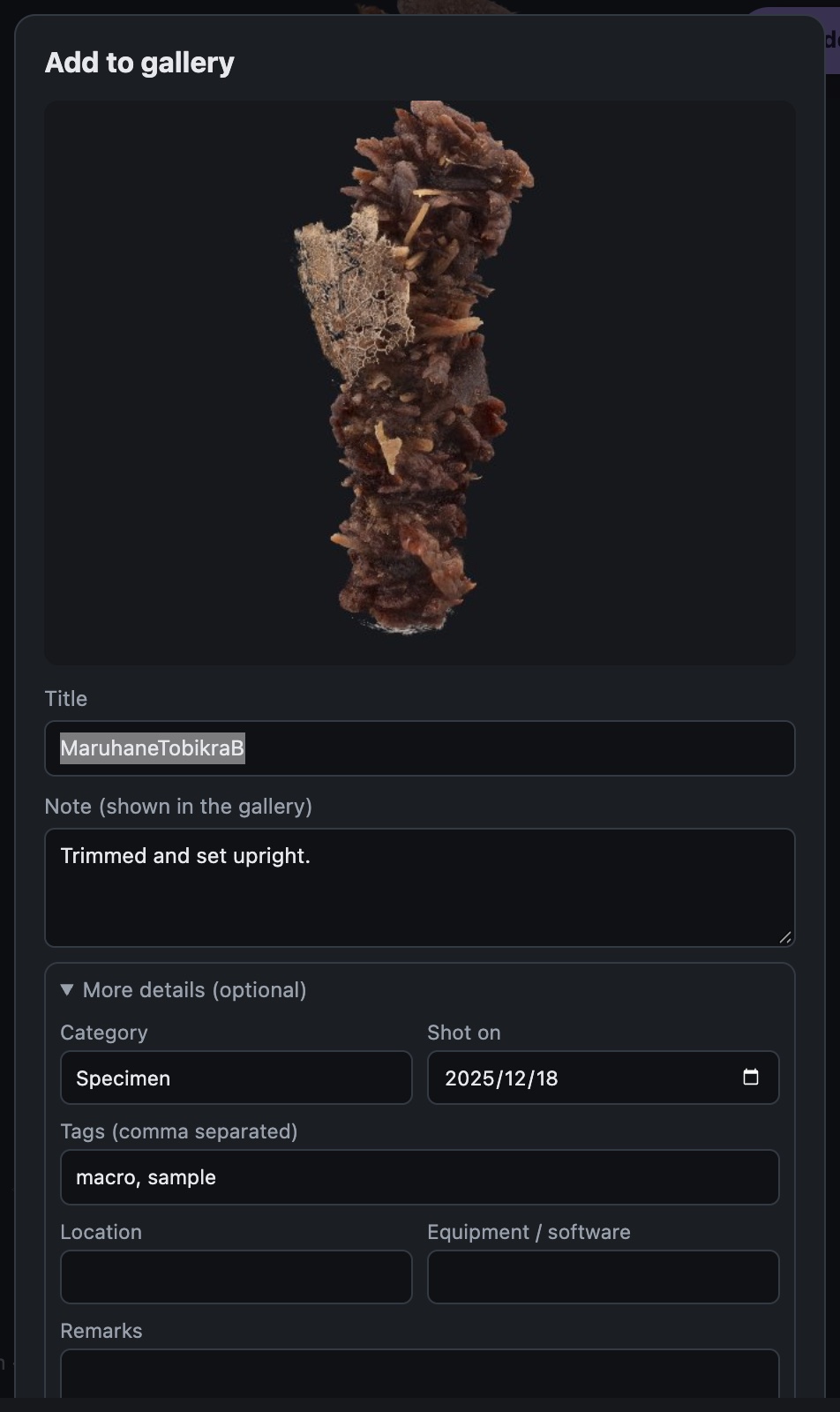
見せたい角度にして、紫の ギャラリーに追加。タイトルやカテゴリーを付けて保存します。
Frame the view you want, press the purple Add to gallery, add a title and category, and save.
-
管理して、HTML ごと書き出す
Manage, then export with HTML
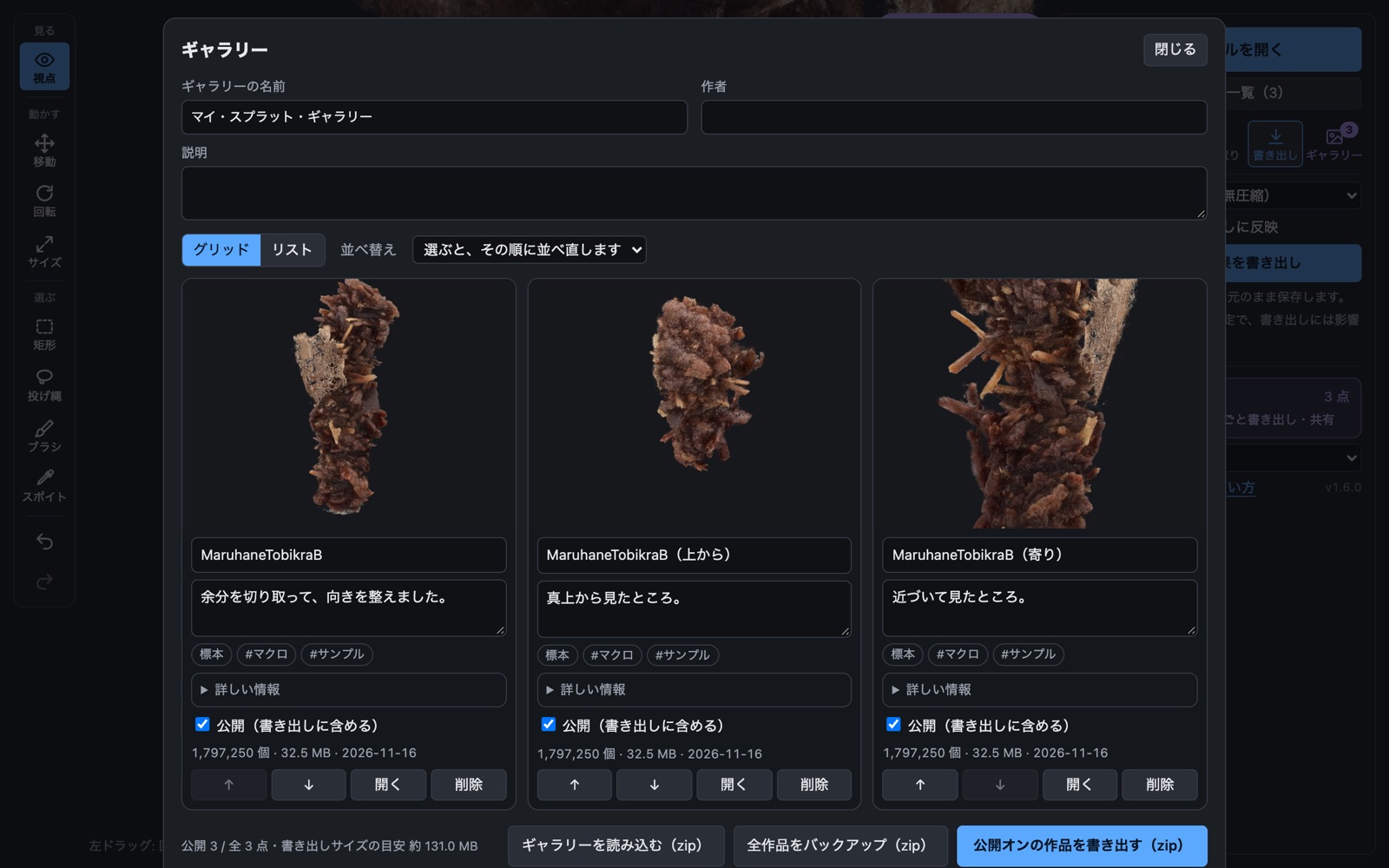
ギャラリーを管理 で公開のオン/オフや並べ替え。公開オンの作品を書き出す で、そのままサイトに上げられるフォルダ(zip)になります。
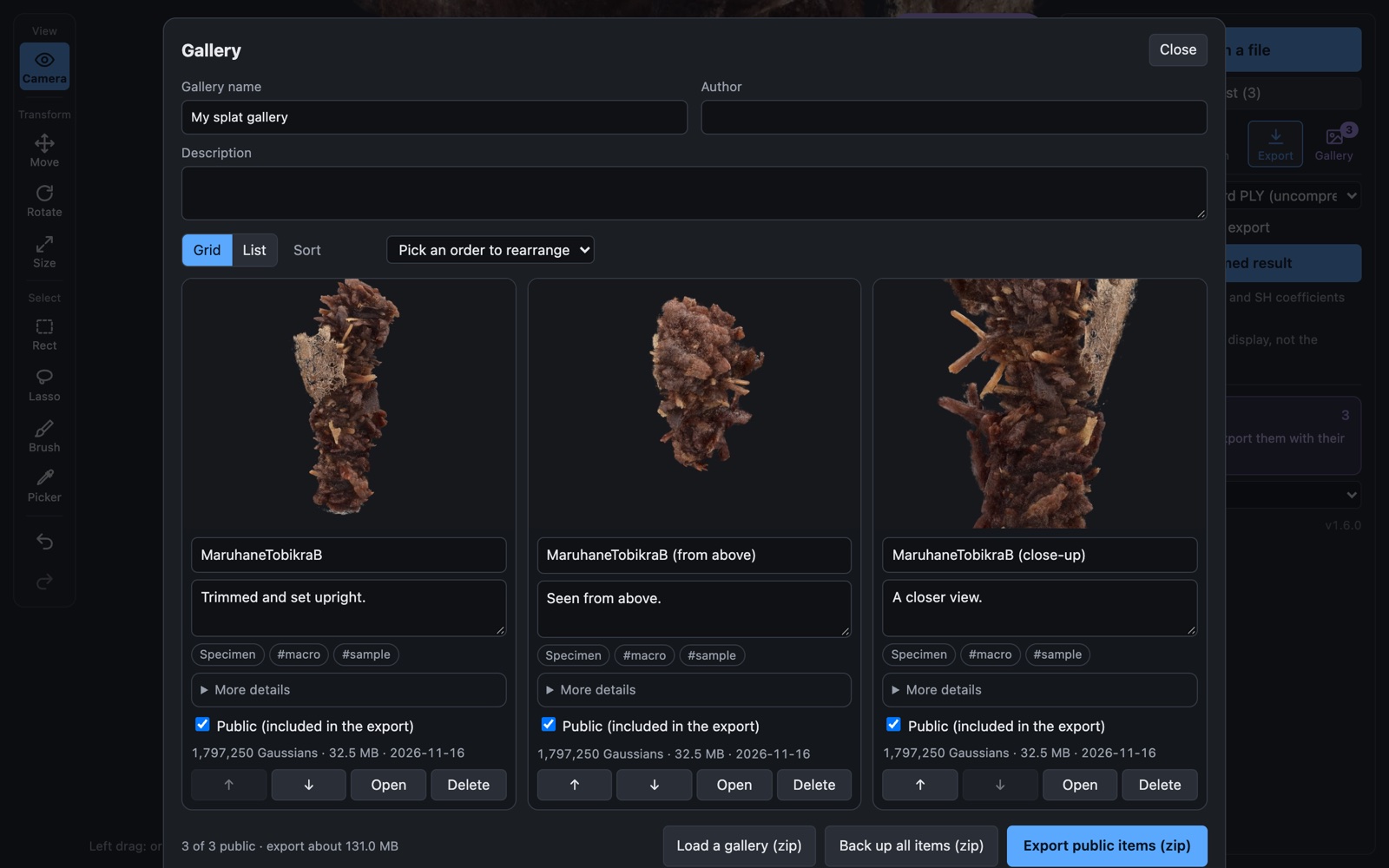
In Manage gallery, switch pieces public or private and reorder them. Export public items gives a folder (zip) ready to upload to any site.
-
一覧表にする
Export a list
一覧を書き出す(Excel) で、サムネイル・元データの場所・属性つきの表になります。
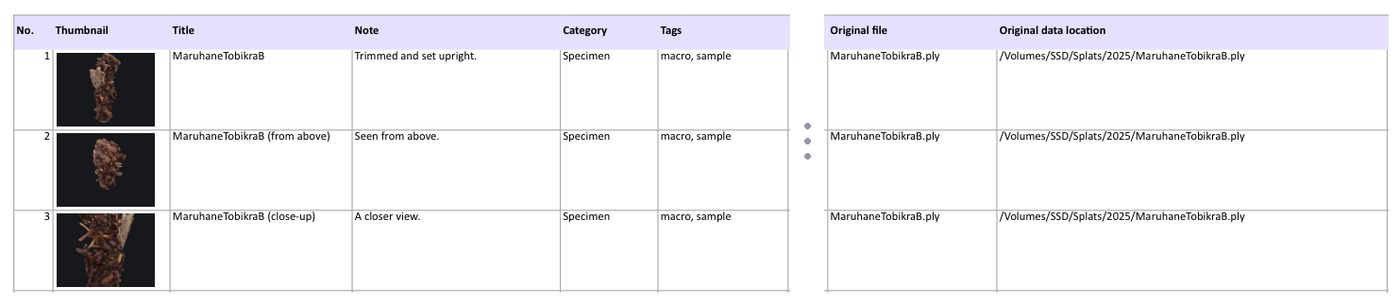
Export list (Excel) makes a table with thumbnails, original data locations and details.
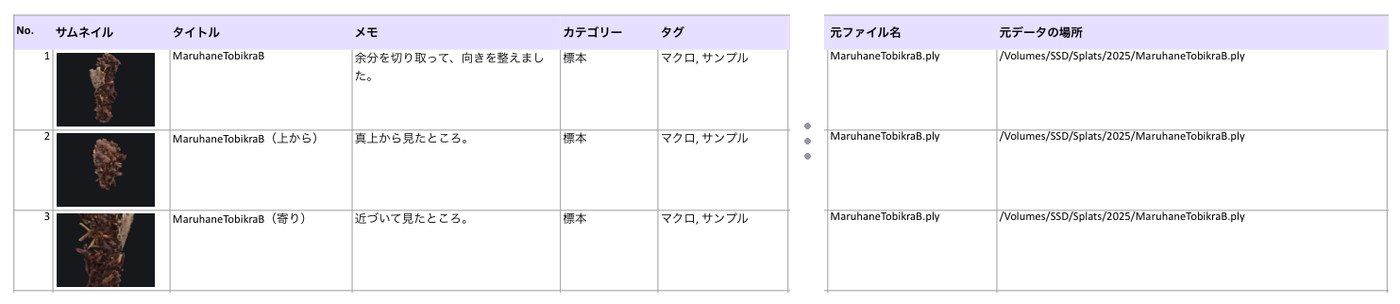
元データの場所は、フォルダーを開いたときの階層で記録されます。フルパスにしたいときは、フォルダーの一覧で このフォルダーが置いてある場所 を一度入れてください(Mac は Finder で ⌥⌘C でコピーできます)。
Locations are recorded from the folder you opened. For full paths, fill in Where this folder lives once in the folder list (on a Mac, ⌥⌘C in Finder copies it).
-
バックアップ
Back up
全作品をバックアップ で非公開分も含めて zip に。ギャラリーを読み込む で戻せます(別の端末への引っ越しにも)。
Back up all items zips everything, private pieces included. Load a gallery restores it, on this or another device.
ギャラリーはこのブラウザの中だけに保存されます。ブラウザのデータを消すと消えるので、ときどきバックアップしてください。
The gallery lives only in this browser. Clearing browser data clears it too, so back it up now and then.
対応している形式
Supported formats
| 形式 | 読み込み | 書き出し |
|---|---|---|
| PLY(標準) | ○ binary little endian。プロパティの並び順は問いません | ○ プロパティ構成と SH 係数は元のまま |
| 圧縮 PLY | ○ SuperSplat / PlayCanvas の形式 | ○ |
| SPZ | ○ バージョン 2〜4 | ○ バージョン 3 |
| SOG | ○ バージョン 2・3 | ○ バージョン 2(SH 係数なし) |
| .splat | ○ | ○ (形式上 SH 係数なし) |
ASCII 形式の PLY には対応していません。
| Format | Read | Write |
|---|---|---|
| PLY (standard) | Yes. Binary little endian, properties in any order | Yes. Property layout and SH coefficients kept as they are |
| Compressed PLY | Yes. The SuperSplat / PlayCanvas format | Yes |
| SPZ | Yes. Versions 2 to 4 | Yes. Version 3 |
| SOG | Yes. Versions 2 and 3 | Yes. Version 2 (no SH coefficients) |
| .splat | Yes | Yes (the format has no SH coefficients) |
ASCII PLY is not supported.
知っておくとよいこと
Good to know
ファイルは外部に送られません。読み込んだファイルとギャラリーは、お使いの端末のブラウザの中だけで扱われ、サーバーへアップロードされることはありません。ツールの改善のため、使われた回数だけを数えています(利用回数の計測)。
Your file stays on your device. Files and your gallery are handled entirely inside your browser and are never uploaded. To improve the tool, only usage counts are recorded (usage counts).
- 表示は基本色のみです。見る角度で変わる色(SH の高次成分)は画面には反映されませんが、書き出すファイルには残ります。
- 圧縮 PLY・SPZ・SOG・.splat は値を粗い数値に丸めるため、わずかに劣化します。SOG と .splat への書き出しでは SH 係数が省かれます。元データは標準の PLY で残しておくことをおすすめします。
- SPZ は座標を変換せず、PLY と同じ向きのまま読み書きします。上下が逆に見えるファイルは 上方向 で直せます。
- 上方向 は表示だけの設定です。回転・移動ツールやボタンでの調整は、向きの調整を書き出しに反映 がオンのときに書き出しへ反映されます(ギャラリーへの保存には常に反映されます)。
- 選択は、画面で重なっている奥のスプラットにも及びます。視点を変えながら、除外 で選びすぎた分を外してください。
- 削除やトリミングは書き出すまで元のファイルに影響しません。
- 大きなファイルは端末のメモリを多く使います。スマートフォンでは軽めのファイルでお試しください。
- ビューアの表示は、設定の 言語 で日本語と英語を切り替えられます。
- The view shows base colour only. View-dependent colour (higher-order SH) is not rendered, but it is kept in the exported file.
- Compressed PLY, SPZ, SOG and .splat round values more coarsely, so quality drops slightly. SOG and .splat exports leave out SH coefficients. Keep your original as a standard PLY.
- SPZ is read and written in the same orientation as PLY, with no coordinate conversion. If a file looks upside down, fix it with Up axis.
- Up axis only affects the display. Rotations and moves made with the tools or buttons are written out when Apply orientation to export is on (and always when you save to the gallery).
- A selection also reaches splats hidden behind the ones you see. Change the view and use Subtract to drop what you did not mean to pick.
- Deleting and trimming do not touch your original file until you export.
- Large files use a lot of memory. On a phone, start with a smaller file.
- The viewer itself switches between Japanese and English under Language in the controls.
利用回数の計測について
About usage counts
どれくらい使われているかを作者が知るために、次の出来事が起きた回数だけを、作者のサイト(splat.radiancefields.net)に送っています。
So that the author can see how much the tool is used, only the number of times these things happen is sent to the author's site (splat.radiancefields.net).
- 送る出来事:ページを開いた/ファイルを開いた/書き出した/ギャラリーに追加した/ギャラリーや一覧表を書き出した
- 一緒に送るもの:ツールの版、開いたファイルの形式(PLY・SPZ など)とガウシアン数のおおよその区分、ページを開くたびに変わるランダムな番号、リンクに付いた
?src=の目印。国・地域(2 文字)は受け取ったサーバー側で判定します - 送らないもの:ファイル名・ファイルの中身・ギャラリーの内容・元データの場所・IP アドレス・Cookie など、個人やデータを特定できる情報
- ページの閲覧数と、どのサイトから来たか(参照元)は、Cookie を使わない Cloudflare Web Analytics で数えています。こちらも個人を特定する情報は記録しません
- ブラウザで「トラッキング拒否(Do Not Track)」や Global Privacy Control をオンにしていると、何も送りません。書き出したギャラリーを見るときや、手元で開いたときも送りません
- Events sent: page opened / file opened / exported / added to the gallery / gallery or list exported
- Sent with them: the tool version, the opened file's format (PLY, SPZ and so on) and a rough Gaussian-count range, a random number that changes each time the page is opened, and any
?src=tag on the link. The country or region (2 letters) is worked out by the receiving server - Never sent: file names, file contents, gallery contents, original data locations, IP addresses, cookies or anything else that could identify you or your data
- Page views and referrers are counted with Cloudflare Web Analytics, which uses no cookies and records nothing that identifies you
- Nothing is sent if Do Not Track or Global Privacy Control is on in your browser, when viewing an exported gallery, or when running the page locally
更新履歴
Version history
バージョン番号は 1.5.0 から付け始めました。それより前の番号は、追加した順にさかのぼって割り当てたものです。いまお使いの版は、ビューアの設定パネルのいちばん下に小さく表示されます。
Version numbers start with 1.5.0; earlier numbers were assigned afterwards in the order features were added. The version you are running is shown in small type at the bottom of the viewer's control panel.
| 1.6.1 2026-11-16 | 使われた回数だけを数える仕組みを追加(ファイル名や中身は送りません。利用回数の計測について)。 |
|---|---|
| 1.6.0 2026-11-16 | サイズ(拡大・縮小)ツールと、色の近いスプラットをまとめて選ぶスポイトを追加。高さを数値で指定することもできます。Excel の一覧表にサムネイルを入れるように。紹介ページを実際の画面のキャプチャ付きに。 |
| 1.5.0 2026-11-16 | メニューを組み替え(左にツールバー、下に操作バー、右の設定をタブ式に、ギャラリーを紫で表示)。フォルダーを開いて階層つきの一覧から選べるように。ギャラリーに元データの場所・ファイル名・サイズ・更新日時を記録。ギャラリーの一覧表を Excel(.xlsx)/CSV で書き出し。バージョン番号を表示。 |
| 1.4.0 | ギャラリーの全作品バックアップと zip からの読み込み。一覧のグリッド/リスト切り替え。Safari でギャラリーのデータが読めなくなる問題を修正。 |
| 1.3.0 | ギャラリー:作品をブラウザに保存し、カテゴリー・タグ・撮影日などの属性を付け、公開オンの作品を HTML 付きのフォルダとして書き出し。 |
| 1.2.0 | 矩形・投げ縄・ブラシで選んで削除(元に戻す/やり直す)。SPZ・SOG・.splat の読み書きに対応。 |
| 1.1.0 | WASD での移動、回転ツール・移動ツール、中心を原点へ・下端を地面へ。日本語/英語の切り替えと紹介ページ。 |
| 1.0.0 | 最初の版。PLY・圧縮 PLY の表示、情報の表示、範囲と不透明度でのトリミング、向きの修正、書き出し、スマートフォン向けの表示。 |
| 1.6.1 2026-11-16 | Usage counts only (no file names or contents; see About usage counts). |
|---|---|
| 1.6.0 2026-11-16 | New Size tool (scale up or down, or set an exact height) and a colour Picker that selects every splat of a similar colour. Thumbnails in the Excel list. This page now shows screenshots of the real screen. |
| 1.5.0 2026-11-16 | Reorganised menus (toolbar on the left, action bar at the bottom, tabbed controls on the right, gallery in purple). Open a folder and pick from a list that keeps the folder hierarchy. The gallery records each original's location, file name, size and modified time. Export the gallery list as Excel (.xlsx) or CSV. Version number shown. |
| 1.4.0 | Back up every gallery item and load a gallery back from a zip. Grid / List switch. Fixed gallery data becoming unreadable in Safari. |
| 1.3.0 | Gallery: keep pieces in the browser with category, tags, shot date and other details, and export the public ones as a folder with its own HTML. |
| 1.2.0 | Select with a rectangle, lasso or brush and delete, with undo and redo. Read and write SPZ, SOG and .splat. |
| 1.1.0 | WASD movement, Rotate and Move tools, centre to origin and bottom to ground. Japanese / English switch and this page. |
| 1.0.0 | First version. View PLY and compressed PLY, show file info, trim by range and opacity, fix orientation, export, phone layout. |
ライセンスと利用について
Licence and terms
- Splat Quick Viewer は無料で使えます。© 2026 Toshihiro Oshima
- このツールで読み込んだファイル、書き出したファイル、書き出したギャラリーは、すべて利用者ご自身のものです。書き出したギャラリーに入るビューア(
viewer.html)は、ギャラリーと一緒に自由に配布・公開できます。 - このツールは現状のまま提供され、動作や結果についての保証はありません。大切なデータは、元のファイルを必ず別に残してください。
- SPZ は Niantic、SOG と圧縮 PLY は PlayCanvas が公開している形式です。各名称はそれぞれの権利者のものです。
- Splat Quick Viewer is free to use. © 2026 Toshihiro Oshima
- Files you load, files you export and galleries you export are all yours. The viewer included in an exported gallery (
viewer.html) may be distributed and published freely together with that gallery. - The tool is provided as is, with no warranty for how it works or what it produces. Always keep your original files separately.
- SPZ is a format published by Niantic; SOG and compressed PLY are formats published by PlayCanvas. Names belong to their respective owners.
組み込んでいるソフトウェア
Included software
SPZ バージョン 4 の読み込みに fzstd 0.1.1 を組み込んでいます(MIT License)。それ以外に外部のライブラリは使っていません。
The viewer embeds fzstd 0.1.1 (MIT License) to read SPZ version 4. No other outside libraries are used.
fzstd — MIT License
Copyright (c) 2020 Arjun Barrett

Permission is hereby granted, free of charge, to any person obtaining a copy
of this software and associated documentation files (the "Software"), to deal
in the Software without restriction, including without limitation the rights
to use, copy, modify, merge, publish, distribute, sublicense, and/or sell
copies of the Software, and to permit persons to whom the Software is
furnished to do so, subject to the following conditions:

The above copyright notice and this permission notice shall be included in all
copies or substantial portions of the Software.

THE SOFTWARE IS PROVIDED "AS IS", WITHOUT WARRANTY OF ANY KIND, EXPRESS OR
IMPLIED, INCLUDING BUT NOT LIMITED TO THE WARRANTIES OF MERCHANTABILITY,
FITNESS FOR A PARTICULAR PURPOSE AND NONINFRINGEMENT. IN NO EVENT SHALL THE
AUTHORS OR COPYRIGHT HOLDERS BE LIABLE FOR ANY CLAIM, DAMAGES OR OTHER
LIABILITY, WHETHER IN AN ACTION OF CONTRACT, TORT OR OTHERWISE, ARISING FROM,
OUT OF OR IN CONNECTION WITH THE SOFTWARE OR THE USE OR OTHER DEALINGS IN THE
SOFTWARE.